
WCAG Criteria
Target Size in WCAG 2.2: What Designers and Developers Should Know
Understand the WCAG 2.2 target-size rule, spacing and other exceptions, and how to audit and remediate small controls across responsive layouts.
Quick answer: what does WCAG 2.2 require for target size?
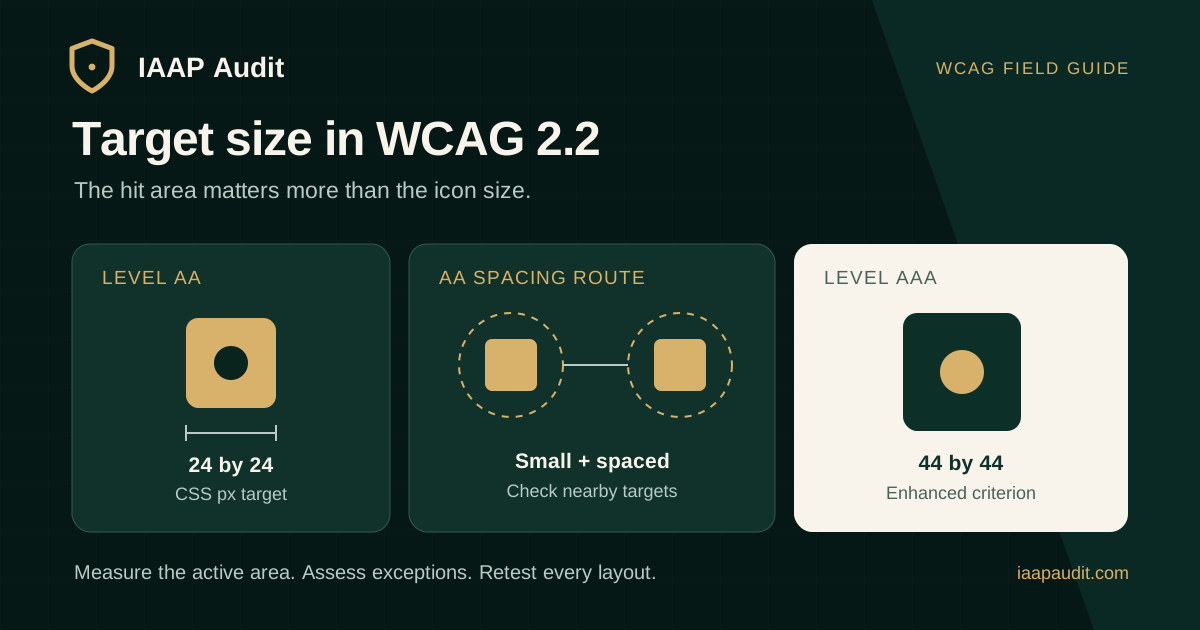
Web Content Accessibility Guidelines (WCAG) 2.2 Success Criterion 2.5.8, Target Size (Minimum), is Level AA. A pointer target generally needs to contain an axis-aligned 24 by 24 CSS pixel square. A smaller target can still meet the criterion through sufficient spacing or one of its other defined exceptions.
This rule helps people who have difficulty activating small, closely packed controls with a mouse, touch screen, pen, or other pointer. It concerns the actual area that responds to pointer input, not merely the dimensions of an icon drawn inside it.
What counts as the target?
The target is the area a person can activate. A 16-pixel icon inside a button with an adequately sized clickable area may satisfy the size requirement even though the artwork itself is smaller. Conversely, adding visual padding that does not respond to input will not enlarge the target.
The W3C explanation says the target must be able to contain a solid, horizontally and vertically aligned 24 by 24 CSS pixel square to meet the size condition. A circular target with a 24-pixel diameter does not contain that square and is therefore assessed as undersized unless an exception applies. Measure the rendered target shape, not only a CSS width declaration.
How does the spacing exception work?
When a target is undersized, WCAG 2.5.8 permits sufficient spacing. Imagine a circle 24 CSS pixels in diameter centered on the bounding box of that small target. The circle must not intersect any other target or the corresponding circle of another undersized target. This is a test of the actual neighboring layout, not a universal instruction to add 24 pixels of gap.
For example, W3C illustrates 20 by 20 CSS pixel controls with a 4-pixel gap that can pass the spacing test. The same controls with no gap fail in the illustrated layout. If a nearby large target overlaps the imaginary circle, the small target may also fail the exception.
Which other exceptions should teams know?
WCAG 2.5.8 has five named exceptions. Document the reason an exception applies instead of treating every undersized control as a violation or exempting an entire component family without examining it.
- Spacing: the 24 CSS pixel circles around undersized targets do not intersect other targets or each other.
- Equivalent: a different control on the same page performs the function and meets this criterion.
- Inline: the target is in a sentence or constrained by the line height of surrounding non-target text. This does not automatically exempt compact navigation or toolbar links.
- User agent control: the browser determines an unmodified control's target size.
- Essential: the particular presentation is essential to the information or legally required. Apply this narrowly and consider an additional usable route when practical.
Is 44 by 44 CSS pixels required for Level AA?
No. WCAG 2.2 Success Criterion 2.5.5, Target Size (Enhanced), uses a 44 by 44 CSS pixel threshold at Level AAA. It is separate from the Level AA minimum in 2.5.8. Some design systems choose larger targets for important actions because they are easier to activate, but that decision should be described as an aim beyond the AA minimum where appropriate.
A target can also technically meet 2.5.8 through spacing while remaining difficult for some users to activate. Treat conformance as a floor, then evaluate whether critical controls need more generous hit areas.
Where do small targets appear in real products?
Icon-only buttons, pagination, table row actions, chart controls, carousel arrows, close controls, calendar dates, and dense toolbars are common places to inspect. Responsive views can introduce new failures when labels wrap, controls collapse into clusters, or margins shrink.
Review all interactive states. A menu or dialog may reveal additional targets with their own size and spacing requirements. Do not assume the desktop layout represents the mobile experience or that increasing browser zoom changes the CSS-pixel rule.
- Test high-frequency actions such as submit, next, close, and account navigation.
- Inspect clustered icons and repeated actions in cards or table rows.
- Check menus, filter chips, calendar controls, and error-message actions after they appear.
- Review responsive breakpoints and orientation changes for newly adjacent targets.
How should designers and developers prevent failures?
Set a minimum interactive hit area in shared components rather than relying on the icon size. Use padding or another real clickable area around the visible content; confirm that the enlarged area actually activates the intended control and does not overlap a neighbor. Keep enough separation where a target cannot be enlarged.
Document exceptional patterns, such as genuinely inline links or spatial controls, with their reason for being small. Check them in the final interface. A Figma measurement alone does not prove the shipped target matches the design, especially when CSS, text wrapping, and overlays change the clickable geometry.
A practical WCAG 2.5.8 audit workflow
Choose representative pages and states, then inspect pointer targets at the rendered viewport. Measure the clickable area and surrounding targets. If the target does not contain a 24 by 24 CSS pixel square, evaluate the spacing test or another applicable exception before reporting a failure.
Automated detection can highlight likely small targets, but the final conclusion needs context: clipped shapes, overlays, link text in a sentence, alternate controls on the same page, and responsive states can affect the result. Pair measurement with actual pointer use on the tested device.
- Record the URL, viewport, orientation, state, and exact target.
- Measure the active area, including its shape, rather than only the icon or CSS box.
- Inspect neighboring active areas and apply the 24 CSS pixel spacing-circle method if undersized.
- Identify and document a valid exception if one is claimed.
- Try the user task and note accidental activation or difficulty where observed.
- Repeat at responsive sizes and in expanded menus or overlays.
What should a target-size finding include?
A useful finding says more than small icon. It identifies the actual clickable dimensions, the closest neighboring targets, whether an exception was assessed, and the consequence for the task. If the issue affects a shared component, name other likely instances so the team can fix the source and retest a sample.
For example, a compact table row with 18 by 18 CSS pixel edit and delete targets separated by too little space may cause accidental deletion. The report should include the rendered state, measurements, screenshot or geometry evidence, criterion 2.5.8, and a proposed component-level change.
- Finding ID, affected page and control, viewport, and state.
- Rendered clickable dimensions or shape and the adjacent-target geometry.
- Exception assessment and reason it does or does not apply.
- User impact, severity rationale, WCAG criterion, and remediation guidance.
- Retest measurements and task outcome after the component is updated.
How should remediation be retested?
Retest the original target and its neighbors in the published interface. Verify that a larger visual button also has a larger active area, that expanded hit areas do not overlap, and that adjacent controls still perform the correct action. If spacing is the chosen route, repeat the spacing-circle assessment after responsive layout changes.
Keep the before-and-after evidence with the audit record. A CSS change on one page does not close a shared component issue until representative uses and states have been checked.
Common questions about target size
Does a 16-pixel icon automatically fail? No. Its interactive target may be large enough, or an exception may apply.
Do all text links need 24 by 24 pixels? Links in sentences can meet the inline exception. Standalone navigation links need their own assessment.
Can zoom be used to claim compliance? No. Zoom does not change a target's CSS-pixel dimensions for this criterion.
Is 44 by 44 the WCAG 2.2 AA rule? No. That size is associated with the separate Level AAA Target Size (Enhanced) criterion.
Official references
W3C WCAG 2.2 Success Criterion 2.5.8 Target Size (Minimum): https://www.w3.org/WAI/WCAG22/Understanding/target-size-minimum.html
W3C WCAG 2.2 Success Criterion 2.5.5 Target Size (Enhanced): https://www.w3.org/WAI/WCAG22/Understanding/target-size-enhanced.html
W3C WCAG 2.2 Recommendation: https://www.w3.org/TR/WCAG22/
Prepare your controls for review
Bring a list of shared button, icon, menu, and table-action components; the pages where they appear; and the responsive views most important to users. Include any documented reasons for exceptional compact controls.
IAAP Audit can evaluate target size and spacing in a scoped accessibility audit, document evidence against WCAG 2.5.8, and retest affected journeys after remediation.