
WCAG Criteria
Dragging Movements and Accessible Alternatives in WCAG 2.2
Understand WCAG 2.2's dragging-movement requirement and how to audit click, tap, and other single-pointer alternatives in real product journeys.
Quick answer: what does WCAG 2.2 say about dragging movements?
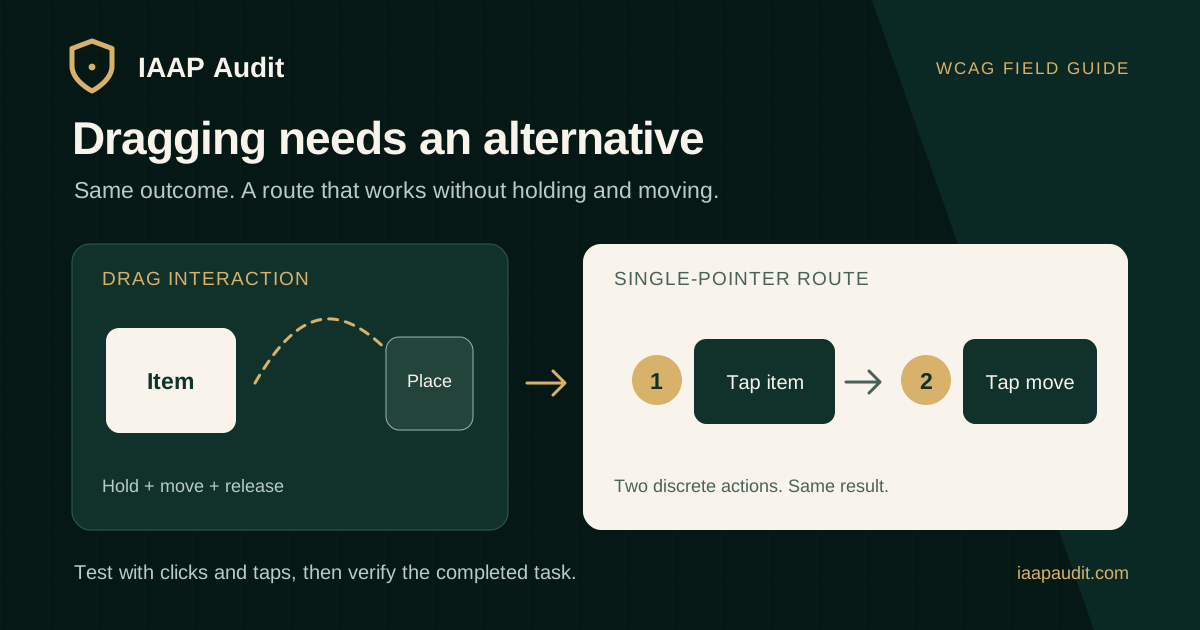
Web Content Accessibility Guidelines (WCAG) 2.2 Success Criterion 2.5.7, Dragging Movements, is Level AA. When a feature uses dragging, users generally need another way to achieve the same function with a single pointer and without dragging. The criterion has exceptions when dragging is essential or when the action is determined by an unmodified user agent.
A single pointer can be a mouse, one finger on a touch screen, or a stylus. The alternative may use clicks or taps, but it must reach the same meaningful result as the drag interaction. This matters to people who cannot hold a pointer down while moving it precisely.
What counts as dragging?
A dragging movement begins when a pointer presses on an element, holds contact while moving it or its representation, and releases it at a destination. Reordering a card, moving a slider thumb, panning a custom map, and dragging an item into a task-board column are common examples.
The criterion concerns functionality interpreted by the web content. Ordinary browser scrolling and dragging a browser scrollbar are provided by the user agent and are generally outside this criterion. A site that replaces those behaviors with its own drag-only interaction needs to be assessed.
Why is a keyboard alternative alone insufficient?
Keyboard access and a non-dragging pointer route address different needs. A person using a touch screen or adapted pointer may not have a physical keyboard available. If an item can be moved with arrow keys but the only pointer route still requires dragging, the pointer requirement of 2.5.7 has not necessarily been met.
Test keyboard operation separately under WCAG 2.1.1 Keyboard where it applies. A well-designed set of clickable move controls can support both keyboard and single-pointer operation, but each mode needs to be verified.
Accessible alternatives for common drag interactions
The alternative does not have to be the same visual control. It must perform the same function on the page without requiring a press-and-hold movement. Make the option discoverable, and check that people can complete the entire task, including confirming the destination or value.
- Sortable list: provide Move up and Move down controls, or let users select an item and then tap a destination.
- Task board: allow a card to be selected and moved to a named column through a menu or adjacent controls.
- Carousel: offer Previous and Next buttons alongside any swipe or drag interaction.
- Slider: let a user tap the track to set the value or enter a precise number in a text field.
- Custom map: provide directional controls as an alternative to drag-to-pan.
- Selection rectangle: allow two separate taps or clicks to set its corners.
Can swipe replace drag?
A swipe or flick that relies on direction, path, or speed is not an adequate sole alternative. WCAG 2.5.1 Pointer Gestures separately addresses path-based and multipoint gestures, and WCAG 2.5.7 addresses dragging movements. If an interface replaces one demanding gesture with another, users may remain blocked.
For a carousel, test whether a person can advance through all content with discrete taps or clicks. For a reorder control, test whether selection and destination can be chosen without holding the pointer down during movement.
When can the essential or user-agent exception apply?
The essential exception is narrow. It applies where removing dragging would fundamentally change the underlying information or functionality and no conforming alternative can achieve it. Freehand drawing may require a continuous path, but moving a card to another column usually does not. Judge the real outcome, not the team's preferred interaction design.
The user-agent exception covers actions determined by an unmodified browser or assistive technology, such as native page scrolling. It does not automatically cover a custom scripted drag interface just because it resembles a browser behavior. Record the reason an exception is claimed and how the feature was tested.
How should designers and developers build the alternative?
Start with the user outcome: reorder an item, change a value, move a card, reveal the next slide, or pan a view. Then design a sequence of discrete controls that reaches that outcome. A select-then-move pattern can use the same underlying state update as dragging, so both routes produce the same final order or destination.
Make control labels and current state clear. Provide a way to cancel a selection when needed. Consider focus and status feedback after a move so keyboard and assistive technology users understand the result. Check target size, keyboard operation, and names under their respective WCAG criteria as part of the full component review.
A practical WCAG 2.5.7 audit workflow
Identify every feature where an element or its representation follows the pointer while pressed. Test each in its published context, including mobile views and touch interactions. Do not assume a keyboard shortcut or a visible arrow proves equivalent pointer operation until the full task has been completed by click or tap alone.
Automated tools may identify drag handlers or patterns, but they cannot reliably verify that a non-dragging route reaches the same result. Manual task testing is necessary.
- Record the URL, feature, viewport, device, and drag-based task outcome.
- Locate the non-dragging single-pointer option without using a keyboard.
- Complete the same task with clicks or taps and compare the final state.
- Check discovery, labels, confirmation, errors, and cancellation where relevant.
- Test the keyboard route separately, and note if either mode is missing.
- Assess any claimed essential or user-agent exception against the actual functionality.
What evidence should a dragging-movement finding include?
A useful finding specifies the task and the barrier. For example, a task board permits a card to move from Review to Approved only by drag-and-drop. If tapping the card reveals no move control, a pointer user who cannot drag cannot complete that transition. The finding should show the initial state, attempted non-dragging route, missing option, and expected result.
Map the observed problem to WCAG 2.5.7 and keep other failures distinct. If the component also lacks keyboard operation, assess that separately under 2.1.1. The report should make remediation and retesting reproducible.
- Finding ID, page, feature, task, tested input method, and viewport.
- Drag outcome and whether an equivalent click-or-tap route exists.
- Screenshots or recording of the control states and reproduction steps.
- User impact, criterion and level, severity rationale, and exception assessment.
- Specific alternative design, owner, and retest scenario.
How should remediation and retesting work?
Implement the alternative in the shared component or workflow that owns the state change. After deployment, retest the original item and destination, then another representative instance. Confirm both drag and non-drag routes produce the same data change, order, or view, and that the alternative remains available on mobile.
Retesting should include the control labels and feedback users receive after an action. A button that appears but does not update the task's final state is not an equivalent route. Keep before-and-after evidence in the audit record.
Common questions about dragging accessibility
Can arrow keys alone satisfy 2.5.7? No, unless the same interface also provides an equivalent single-pointer route without dragging. Keyboard requirements are assessed separately.
Does every drag interaction have to be removed? No. The drag route can remain if an equivalent non-dragging pointer option is available, unless a valid exception applies.
Does a swipe count as a suitable replacement? A path-based swipe alone does not resolve the pointer-gesture issue; provide a discrete way to achieve the outcome.
Does native browser scrolling fail? Usually not under this criterion, because the browser supplies it. Assess custom content-controlled dragging separately.
Official references
W3C WCAG 2.2 Success Criterion 2.5.7 Dragging Movements: https://www.w3.org/WAI/WCAG22/Understanding/dragging-movements.html
W3C WCAG 2.2 Success Criterion 2.5.1 Pointer Gestures: https://www.w3.org/WAI/WCAG22/Understanding/pointer-gestures.html
W3C WCAG 2.2 Success Criterion 2.1.1 Keyboard: https://www.w3.org/WAI/WCAG22/Understanding/keyboard.html
W3C WCAG 2.2 Recommendation: https://www.w3.org/TR/WCAG22/
Prepare drag-based journeys for review
List sortable items, task boards, sliders, maps, carousels, and other drag-operated features. For each, state what outcome the user must achieve and which alternative controls are intended to provide it.
IAAP Audit can assess those interactions as part of a scoped WCAG 2.2 accessibility audit, document the user impact and applicable criterion, and retest the published journey after remediation.