
Reporting
Accessibility Audit Severity Levels Explained
A practical guide to accessibility audit severity levels, explaining how critical, high, medium, low, and advisory findings should be prioritized.
Quick answer: what are accessibility audit severity levels?
Accessibility audit severity levels are priority labels used to explain how serious each finding is and how quickly it should be remediated. Common labels include critical, high, medium, low, and advisory.
Severity should be based on user impact, the importance of the affected task, how often the issue appears, whether a reasonable workaround exists, and whether the issue creates delivery, procurement, governance, or regulatory risk.
Severity is not the same as WCAG conformance level
WCAG conformance levels are A, AA, and AAA. They describe groups of success criteria that a page or product must satisfy for a defined conformance target. Severity labels are different. They help an audit team and a remediation team prioritize the findings found during evaluation.
A Level A failure is not automatically critical, and a Level AA failure is not automatically medium. The real severity depends on the user barrier, affected journey, evidence, frequency, and business context.
- WCAG level explains the standards requirement.
- Severity explains remediation priority.
- User impact explains why the finding matters.
- Evidence explains how the team can reproduce and verify the issue.
- Retest status explains whether the barrier was actually closed.
Why severity levels matter in an audit report
W3C explains that accessibility evaluation is also called assessment, audit, and testing, and that tools alone cannot determine whether a site meets accessibility standards. That is why severity should not be copied mechanically from an automated scan.
A useful severity model turns audit evidence into decisions. It helps leadership understand risk, helps product teams plan releases, helps engineers fix blockers first, and helps compliance teams track remediation progress.
- Which barriers should be fixed before launch or submission?
- Which issues block important user journeys?
- Which findings affect reusable components across many pages?
- Which issues need design, engineering, content, document, or vendor ownership?
- Which fixes need manual retesting before closure?
A practical five-level severity model
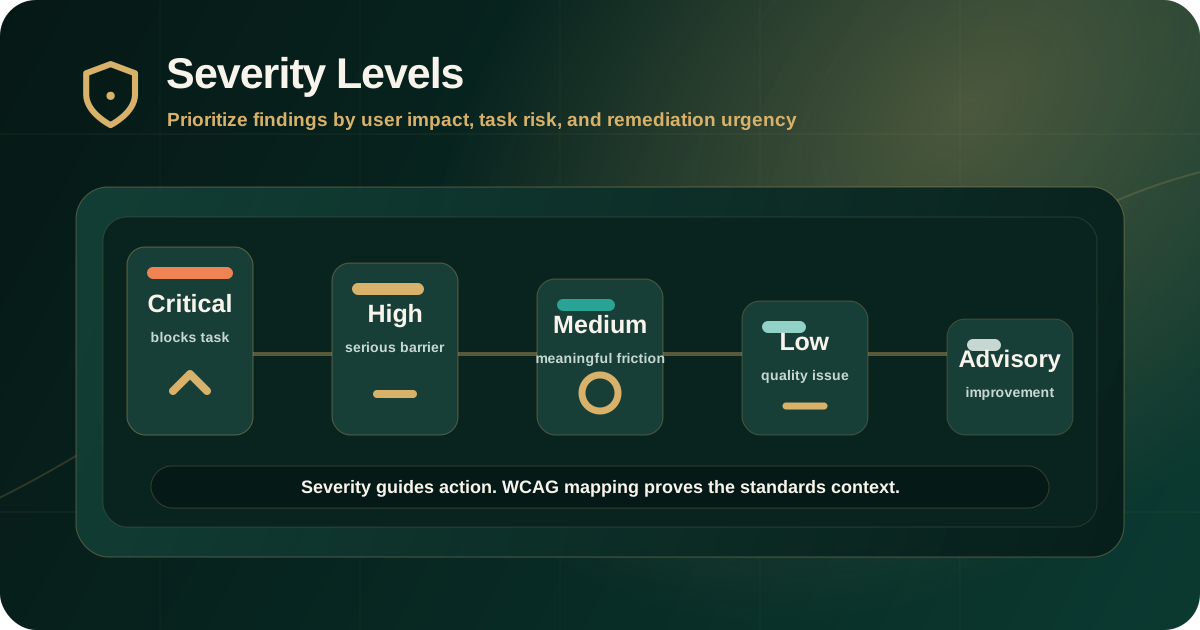
Many audit reports use a five-level model: critical, high, medium, low, and advisory. The labels are useful only when the report defines them clearly and applies them consistently.
The model should be simple enough for non-technical stakeholders to understand and specific enough for delivery teams to act on.
- Critical: blocks a core task for one or more user groups and needs urgent remediation.
- High: creates a serious barrier in an important workflow and should be prioritized in the next remediation cycle.
- Medium: creates meaningful friction, confusion, or partial exclusion but may not fully block task completion.
- Low: affects accessibility quality but has limited immediate task impact.
- Advisory: improvement, best-practice, usability, or risk-reduction item that may not be a direct standards failure.
Critical findings
Critical findings usually block users from completing an essential task or accessing important information. They often affect keyboard users, screen reader users, low-vision users, users relying on captions, or users who need accessible documents.
A critical issue should have strong evidence because it usually drives immediate remediation decisions.
- A keyboard trap prevents users from leaving a modal, menu, payment step, or form.
- A screen reader user cannot identify or operate a primary action such as submit, pay, download, or continue.
- A required form cannot be completed because labels, errors, or instructions are inaccessible.
- An important PDF, disclosure, statement, or regulatory document is unreadable due to missing structure or incorrect reading order.
- A core workflow is inaccessible in a way that has no reasonable workaround.
High findings
High findings create serious accessibility barriers, especially in important journeys, but they may not block every user or every instance of the task. They still deserve early remediation because they can create substantial user impact and operational risk.
High severity often applies when the affected component appears across multiple pages or when the issue affects account access, service requests, documents, support, checkout, onboarding, or investor-facing workflows.
- Focus order makes a key workflow confusing or unreliable.
- Error messages are visible but not programmatically associated with fields.
- Interactive controls have unclear or incorrect accessible names.
- Important content fails contrast in a repeated template.
- A reusable component creates the same barrier across many pages.
Medium findings
Medium findings create meaningful accessibility problems but usually do not fully prevent task completion. They still matter because repeated medium issues can create a poor experience and can become high risk when they appear in critical journeys.
Medium severity should not be used as a parking label for uncertain findings. If the impact is unclear, the report should explain what evidence is missing or what user context needs confirmation.
- Heading structure is confusing but the main content can still be understood.
- Some links or buttons need clearer purpose in context.
- An image has weak alternative text but nearby content reduces the immediate impact.
- A non-critical component has inconsistent keyboard behavior.
- Instructions are present but not as clear or programmatically robust as they should be.
Low and advisory findings
Low findings usually affect quality, consistency, or edge-case accessibility rather than blocking an important task. Advisory findings may be best-practice recommendations, usability improvements, preparation notes, or items outside the strict audit target.
These findings still have value. They help teams improve the product systematically and prevent small issues from becoming recurring accessibility debt.
- Minor naming inconsistency where the task remains understandable.
- Low-impact contrast, spacing, or content clarity issue outside critical journeys.
- A best-practice recommendation for clearer instructions or more consistent focus treatment.
- An observation about future design-system cleanup.
- A risk note for a third-party widget, document process, or content workflow.
How severity should be assigned fairly
Severity should be evidence-led. A finding should not be marked critical only because it looks dramatic, and it should not be marked low only because it is technically small.
A fair severity decision considers the barrier, the affected users, the affected task, the scope of repetition, the availability of a workaround, and the effort needed to verify closure.
- User impact: who is affected and how strongly?
- Task criticality: is the issue in login, payment, application, support, document access, search, or account management?
- Frequency: does the issue occur once, across a template, or across a design-system component?
- Workaround: can users reasonably complete the task another way?
- Evidence strength: are reproduction steps, screenshots, keyboard paths, or screen reader notes clear enough?
- Remediation dependency: does the fix require design, engineering, content, document remediation, or vendor action?
How severity supports remediation planning
Severity should make remediation planning easier. Critical and high issues usually need earlier triage, named ownership, and manual retesting. Medium and low issues can often be grouped into design-system, content, template, or backlog workstreams.
The strongest reports connect severity to next steps instead of leaving teams with labels only.
- Critical and high findings should have clear owners and target remediation windows.
- Repeated component issues should be fixed at the source pattern where possible.
- Document issues should be grouped by document type and risk level.
- Content and alt text issues should have editorial ownership.
- Every major finding should include expected accessible behavior for retesting.
Common mistakes with severity labels
Severity labels become unreliable when they are inconsistent, unexplained, or disconnected from user impact. A report can have a polished severity table and still be weak if the labels do not help teams make decisions.
Buyers should review the severity model before accepting an audit report as remediation-ready.
- Treating automated tool severity as final without expert review.
- Confusing WCAG A, AA, and AAA with critical, high, medium, and low.
- Assigning severity without explaining user impact.
- Ignoring repeated component-level issues because each single instance appears small.
- Using advisory findings to hide direct accessibility failures.
- Closing issues without retest evidence connected to the original severity.
What a good report should include for severity
A good accessibility audit report should define the severity model before listing findings. Each finding should then show the selected severity, the reason for that severity, the affected users, the affected task, standards mapping, evidence, remediation guidance, and retest expectation.
This makes severity useful for governance and delivery. It gives leadership a clear risk view and gives teams a practical order of work.
- Severity definition table.
- Finding-level severity with rationale.
- User impact and affected journey.
- WCAG or applicable standard mapping.
- Evidence used to support the rating.
- Recommended remediation owner or workstream.
- Retest status after remediation.
Practical recommendation
Use severity as a decision tool, not as decoration. The label should tell teams what to fix first, why it matters, who is affected, and what evidence is needed to prove closure.
For compliance-sensitive products, prioritize issues that block core journeys, affect regulated or customer-facing documents, repeat across shared components, or create barriers with no reasonable workaround.
Official references used
W3C Evaluating Web Accessibility Overview: https://www.w3.org/WAI/test-evaluate/
W3C WCAG-EM Overview: https://www.w3.org/WAI/test-evaluate/conformance/wcag-em/
W3C WCAG 2.2 Conformance Requirements: https://www.w3.org/TR/WCAG22/#conformance
W3C WCAG Overview: https://www.w3.org/WAI/standards-guidelines/wcag/