
WCAG Criteria
Alternative Text: What Counts as Meaningful Alt Text?
A practical guide to writing and auditing image alternatives for informative, functional, decorative, and complex images under WCAG.
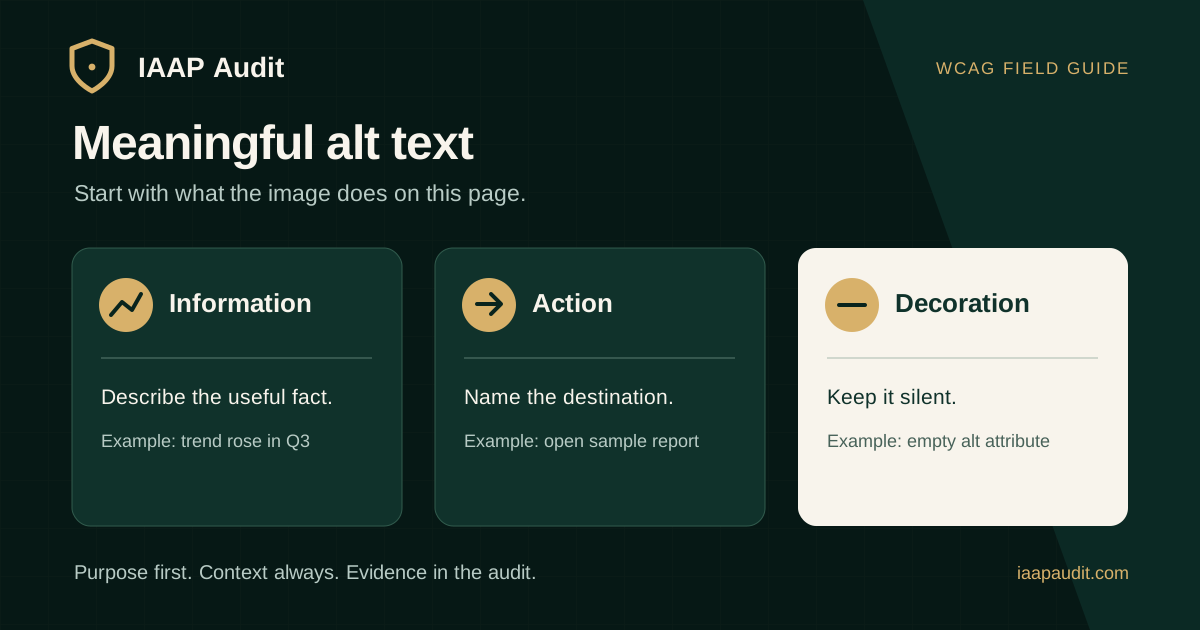
Quick answer: what counts as meaningful alt text?
Meaningful alt text gives someone who cannot see an image the information or function needed to use the page. It describes the image's purpose in context rather than cataloguing every visible detail. For an informative image, that may be a short description; for an image-only link, it is usually the destination; for a decorative image, an empty alt attribute is often the right choice.
The Web Content Accessibility Guidelines (WCAG) 2.2 Success Criterion 1.1.1, Non-text Content, requires a text alternative serving the equivalent purpose for non-text content, with specified exceptions. The criterion is Level A. A useful audit checks whether that purpose is actually available to the user, not simply whether an alt attribute exists.
Why image context changes the answer
Imagine a screenshot of a payment error. In a report about error recovery, the important fact might be that the message appears below the field and is not announced. In a product gallery, the same screenshot could be unnecessary if the surrounding copy already explains everything it shows.
Read the heading, caption, adjacent paragraph, and link or button around an image before writing its alternative. Ask what a reader would miss if the image were unavailable. If nothing is lost because real text already conveys the same meaning, repeating that text in alt can add noise.
A decision checklist for image alternatives
Classify the image by what it does on this page. W3C's image decision tree separates images of text, functional images, informative images, complex graphics, redundant content, and decoration. A design system can support those cases, but an editor still needs to decide which case applies to each use.
- Does the image contain essential text that is unavailable as real text nearby? Include that text in the alternative or provide it as accessible page text.
- Is the image the only content in a link or button? Name the action or destination, such as Download audit sample, instead of describing the icon shape.
- Does the image contribute a fact, state, or comparison? Describe that contribution briefly.
- Does a chart or diagram communicate several relationships? Give it a concise identifier and make the significant details available nearby in text or an accessible data presentation.
- Is the image purely decorative or does it repeat nearby text? Use an empty alt attribute for an HTML image so assistive technology can skip it.
Informative images: describe the useful fact
An informative image contributes something a reader needs to understand the content. For example, a photograph showing a ramp blocked by a temporary sign might need an alternative such as Temporary sign obstructs the entrance ramp when the article discusses access to the building.
Avoid generic labels such as photo or graphic when they omit the reason the image was included. Avoid inventing claims the image cannot establish. If a caption already gives the full meaning, review whether repeating it in alt would help or merely duplicate the same information.
Functional images: name the result of the action
An image-only control needs a name that tells users what activating it will do. For a logo linking to the homepage, the destination may be IAAP Audit home. For a magnifying-glass button, Search is more useful than magnifying glass.
If a button already has a visible text label, its icon may be decorative and should not produce a second announcement. When an SVG icon is used inside a button, the control can carry the accessible name while the icon is hidden from the accessibility tree. Verify the accessible name and the actual action together.
Decorative and redundant images: use empty alt deliberately
An ornamental flourish, spacing texture, or image that adds no information to the surrounding text can use alt="" on an HTML img element. That is different from omitting the attribute: a missing alternative may cause some assistive technologies to expose the file name or URL.
An image becomes decorative because of its role in this context, not because it looks artistic. A photograph used as evidence may need a description even if the same photograph could be decoration elsewhere. If important information is painted into a CSS background, provide its meaning in accessible page content.
Complex charts and diagrams need a second layer of information
A short alt can identify a chart's subject and main conclusion, but it usually cannot carry all values, categories, and trends. Provide the important data or explanation in nearby text, an accessible table, or another suitable presentation. A person should be able to understand the point of the visual without depending on the pixels.
For an accessibility audit dashboard chart, a useful short alternative might state what period and measure the chart covers, while the adjacent text provides the actual trend and figures. The audit should compare that text with the visual and flag omissions that change the conclusion.
Images of text, logos, and linked graphics
If an image contains words that are not otherwise available, its text alternative should preserve the relevant words and purpose. When possible, render important text as real text so it remains available for resizing, translation, selection, and user styling.
Logos require context too. A linked logo with no adjacent text can identify the organization's home destination. A logo next to an equivalent text link may use empty alt to avoid announcing the same name twice. When an image also communicates a status or warning, ensure that meaning is retained even if surrounding brand text is present.
How auditors test meaningful alt text
An automated scan can detect some missing attributes, but it cannot reliably judge whether a description is accurate, relevant, or needlessly repetitive. Test representative templates and important journeys with the rendered page and an assistive technology view.
Review content states, including responsive image variants, linked cards, icon buttons, charts, and error illustrations. The same asset can appear in several contexts with different alternative text needs.
- Record the page URL, image or control, visible context, and accessible name or alternative actually exposed.
- Compare the information available visually with what a screen reader user receives.
- Activate image-only controls to confirm the announced purpose matches the destination or action.
- Inspect decorative and duplicate images for unnecessary announcements.
- Check that detailed chart information is available outside the image when a short alternative is insufficient.
- Retest the original context and other instances of any shared component after remediation.
What should an audit finding include?
A useful finding describes the user consequence. For example: on the Download sample report card, the only linked content is an icon whose accessible name is document. A screen reader user cannot identify the destination from that name. Record the observed name, the link target, the expected purpose, and a proposed accessible name such as Download sample audit report.
Findings should map to the relevant WCAG requirement and explain why the observed alternative fails to serve the image's purpose. Do not label every terse alternative as a failure; a short description can be sufficient when it conveys the necessary meaning.
- Affected URL, template, state, and image or control identifier.
- Visible image or screenshot, surrounding text, and exposed alternative or accessible name.
- Expected information or action, actual experience, user impact, WCAG mapping, and severity rationale.
- Remediation direction, owner, related component instances, and repeatable retest steps.
Common questions about alt text
Does every image need a descriptive sentence? No. Pure decoration and fully redundant imagery can use an empty alt attribute. Meaningful alternatives serve a purpose; they do not always describe appearance.
Is there a mandatory character limit? WCAG does not prescribe a universal alt-text character count. Keep simple alternatives concise and place longer explanations where users can read them in context.
Can AI-generated descriptions be published without review? They should be reviewed against the page context and the image. Automated output can miss the point, invent details, or describe visual appearance when the user needs an action or result.
Official references
W3C WCAG 2.2 Success Criterion 1.1.1 Non-text Content: https://www.w3.org/WAI/WCAG22/Understanding/non-text-content.html
W3C WAI Images Tutorial and alt decision tree: https://www.w3.org/WAI/tutorials/images/decision-tree/
W3C WAI informative images: https://www.w3.org/WAI/tutorials/images/informative/
W3C WAI functional images: https://www.w3.org/WAI/tutorials/images/functional/
W3C WAI decorative images: https://www.w3.org/WAI/tutorials/images/decorative/
W3C WAI complex images: https://www.w3.org/WAI/tutorials/images/complex/
W3C WAI images of text: https://www.w3.org/WAI/tutorials/images/textual/
Prepare your image content for review
Before requesting an audit, identify high-use pages, image-only controls, data visuals, and content components that editors reuse. Include the page text and the intended user task so reviewers can judge alternatives in context.
IAAP Audit can review image alternatives as part of a scoped accessibility audit, document the evidence behind each finding, and retest the affected journeys after remediation.