
WCAG Criteria
Heading Structure and Landmarks: Why They Matter in Audits
How to audit heading structure, page landmarks, and bypass navigation, with practical evidence and remediation guidance for content and product teams.
Quick answer: why audit heading structure and landmarks?
Heading structure and landmarks provide routes through a page for people using assistive technology. Headings identify topics and their hierarchy, while landmarks identify areas such as navigation and main content. An accessibility audit checks whether those routes reflect the page people see and help users find what they need.
For product, content, and compliance teams, the practical question is whether an important section can be located and understood independently of its visual styling. This guide covers web pages under the Web Content Accessibility Guidelines (WCAG), with particular attention to WCAG 2.2 Level A and AA.
What is the difference between headings and landmarks?
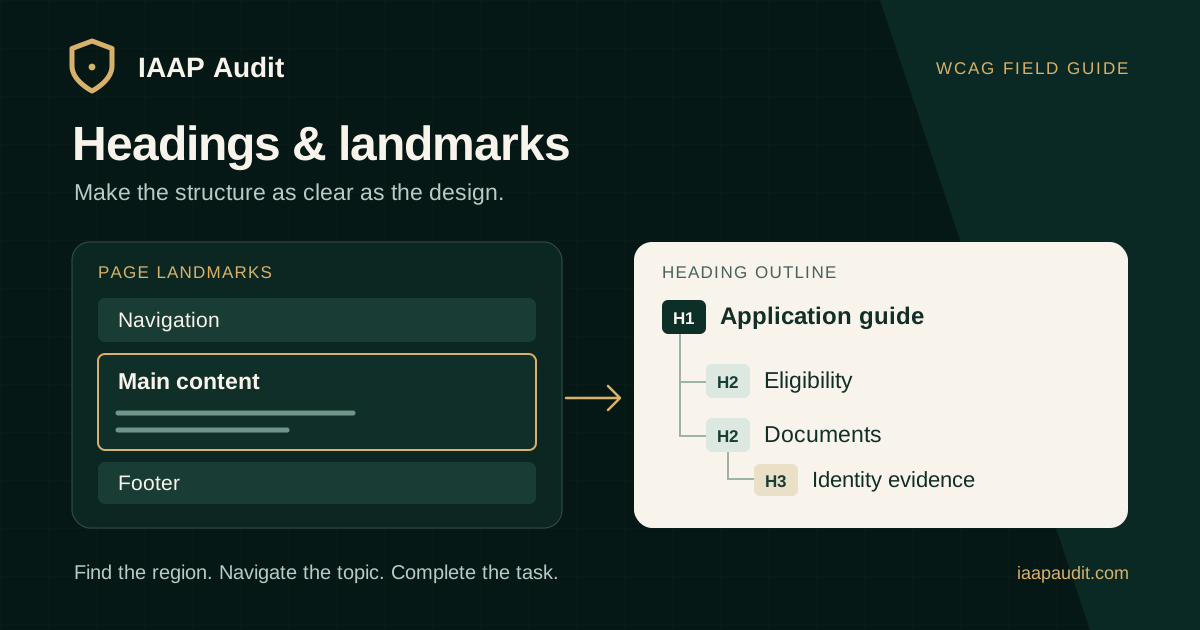
A heading names a topic within the content. A landmark identifies a larger functional area. A user might first move to the main landmark and then browse its headings to find application requirements, fees, or support information.
HTML heading elements h1 through h6 express rank. Native elements such as main and nav expose page regions. Making text large or bold does not give it heading semantics, and drawing a box around content does not create a landmark.
Which WCAG requirements apply?
Map findings to the requirement affected by the observed behavior. Do not treat every structural recommendation from a checking tool as a WCAG failure. W3C tutorials and techniques explain implementation options; the success criteria define the conformance requirements.
- 1.3.1 Info and Relationships, Level A: structure and relationships conveyed through presentation must be programmatically determinable or available in text. Visually identified headings with missing semantics can be relevant here.
- 2.4.1 Bypass Blocks, Level A: users need a mechanism to bypass blocks repeated across pages. Evaluate the available mechanism and its operation, rather than assuming one prescribed HTML pattern.
- 2.4.6 Headings and Labels, Level AA: headings and labels that are provided must describe their topic or purpose. This criterion addresses meaning; heading markup is a separate question.
- 2.4.10 Section Headings is Level AAA. Do not present its requirement to organize content with section headings as an additional Level AA obligation.
How should teams check the heading outline?
Read the heading list without the surrounding paragraphs. On an application page, Application requirements, Supporting documents, and Submission steps give users a useful route. Repeated headings such as Details can make destinations difficult to distinguish.
A clear page-level h1 followed by logically nested subheadings is a useful authoring convention. WCAG does not impose a universal exactly-one-h1 rule. Investigate skipped ranks in context: returning from h3 to h2 can correctly end a subsection, while moving from h2 to h4 deserves review of the intended hierarchy.
- Compare the visual topic divisions with the headings exposed to assistive technology.
- Check whether rank communicates actual parent and child topics instead of a preferred font size.
- Inspect shared cards, accordions, and reusable sections in the surrounding page context.
- Confirm responsive variants do not expose hidden duplicate titles.
- Review headings after content updates, filtering, and client-side route changes.
Which landmarks should auditors inspect?
Start with the page's actual layout and purpose. A typical site has a page header, navigation, main content, and footer; a portal might also have complementary information or search. Use the native HTML element that fits the area. A header inside an article does not become a site-wide banner merely because it uses the header element.
When navigation regions serve different purposes, give them distinguishing names such as Primary and Account. Regions with identical links and purpose can share a name. A section needs an accessible name to expose a region landmark; reserve named regions for useful navigation destinations instead of every visual container.
- Inspect the landmark list and confirm the primary content is easy to identify.
- Check names against the actual content of each region.
- Look for unnecessary nesting and repetitive regions that make navigation noisy.
- Check whether mobile menus or off-screen components remain exposed when unavailable visually.
Do landmarks replace a skip link?
Landmarks can support bypass navigation, but ordinary Tab navigation does not automatically provide the same shortcuts as a screen reader. A visible-on-focus skip link is a practical way to help keyboard users move past repeated navigation.
When a skip link is implemented, activate it from the top of the page and continue navigating. Confirm the reading or focus position reaches the intended destination and the next keyboard action does not restart in the header. Check the behavior in the browser and assistive technology combinations included in the audit scope.
A practical heading and landmark audit workflow
Choose representative templates before testing individual URLs: an article, service page, search result, account screen, and a transaction journey may have different structures. Include meaningful states such as an expanded menu or loaded result set.
Automated checks can flag some missing or invalid structure. Manual review is needed to judge whether an outline makes sense and whether destinations describe the information users will find.
- Record the URL, template, state, viewport, and test environment.
- Compare the visible layout with the browser accessibility tree.
- Use the screen reader's heading list and landmark navigation, recording the commands and results.
- Attempt a concrete task, such as finding eligibility requirements or reaching support.
- Test repeated-content bypass with the keyboard.
- Separate confirmed criterion failures from usability recommendations requiring contextual judgment.
What should a useful audit finding contain?
An example finding could describe a visually prominent Supporting documents title rendered as a styled paragraph on an application page. Record that heading navigation skips that section, identify the markup, and explain the extra effort required to locate the document requirements. If the visual heading relationship is not otherwise exposed, the evidence can support a 1.3.1 finding.
A different finding may concern a heading whose wording describes the wrong content. Keep the semantic and editorial issues distinct so the responsible team can address the actual cause.
- Finding ID, affected page, shared component, and reproduction steps.
- Screenshot plus heading or landmark output; a screenshot alone cannot establish exposed semantics.
- Expected and actual behavior, user impact, criterion, and conformance level.
- Recommended change and the pages or templates that may share the problem.
- Retest environment, outcome, and remaining limitations.
How should remediation and retesting work?
Correct the source of the pattern. A content editor may need heading guidance, while a shared card component may need a configurable heading level. Keep typography in CSS so changing semantic rank does not force the design to change.
Retest the original task after the fix, then sample other uses of the affected template. Confirm the revised structure remains useful when content is longer, sections are missing, or the layout changes on mobile. Record verified results against the finding instead of closing it solely because code was merged.
Common questions about heading accessibility
Does a missing h1 automatically fail WCAG? No. Determine whether the page's structure and topic are conveyed and which criterion, if any, is not met. A primary heading remains a strong default for content templates.
Does every section need a landmark? No. Too many named regions can make a navigation list harder to use. Choose destinations that help users orient themselves.
Can an automated scan certify the heading structure? No. A scan cannot establish whether titles are meaningful for the content and user task; that requires human evaluation.
Official references
W3C WCAG 2.2, including criteria 1.3.1, 2.4.1, 2.4.6, and 2.4.10: https://www.w3.org/TR/WCAG22/
W3C WAI headings tutorial: https://www.w3.org/WAI/tutorials/page-structure/headings/
W3C WAI page regions tutorial: https://www.w3.org/WAI/tutorials/page-structure/regions/
W3C WAI guidance on labeling regions: https://www.w3.org/WAI/tutorials/page-structure/labels/
W3C understanding Headings and Labels: https://www.w3.org/WAI/WCAG22/Understanding/headings-and-labels.html
W3C understanding Bypass Blocks: https://www.w3.org/WAI/WCAG22/Understanding/bypass-blocks.html
W3C understanding Info and Relationships: https://www.w3.org/WAI/WCAG22/Understanding/info-and-relationships.html
W3C ARIA Authoring Practices Guide, landmark regions: https://www.w3.org/WAI/ARIA/apg/practices/landmark-regions/
Prepare for an audit of your page structure
Gather representative templates, important user tasks, shared component details, and the agreed WCAG target. Those inputs help an auditor distinguish an isolated content error from a pattern affecting the wider service.
Discuss heading, landmark, and keyboard navigation testing with IAAP Audit as part of a scoped accessibility review. Request findings that explain the user impact and give your team a clear route from remediation to verified closure.